Skip to content
Archive of posts tagged ManuSoft

QuikPik 4.1 Adds Classic Title Bar Feature

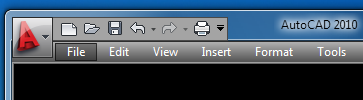
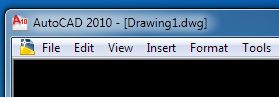
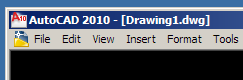
Those of you with bad eyesight (and the rest of us throwbacks) will appreciate the new ‘Classic title bar’ feature in QuikPik 4.1. This new feature addresses AutoCAD 2009 and later versions of AutoCAD with the fancy schmancy title bar and menu bar.

Out-of-the-box (not customizable):

QuikPik ‘Classic title bar’ (Windows 7 Aero Theme):

QuikPik ‘Classic title bar’ (Windows 7 Classic Theme):

If you already own a QuikPik license, you can get the new version by logging in and downloading it again from the link in your order detail. If you don’t own QuikPik yet, try it out by installing the shareware version — and if you like it, buy it!

New ManuSoft web site

After over 10 years of the same infrastructure and the same look and feel, the ManuSoft web site has finally been given an overhaul. The original web site used Perl scripts that I wrote myself to serve up pages by patching together a header, table-of-contents, and main content frame and displaying it either as a 3-frame web page or by using an HTML <table> to format the layout. It wasn’t exactly pretty, but it functioned well and served its purpose for a long time.

So what prompted the new design? Primarily my desire to make it easier for customers to download updates to previously purchased software. The old web site used a rather simplistic authentication system that resulted in me spending a lot of time looking up order numbers for customers who had lost their order information. There also was no automated way for customers to update their own registration information, so I had to do that as well.

The new web site requires only a user name and password, both of which can be retrieved or reset simply by entering the email address for the account. Hopefully this will reduce the need for manual intervention. If you purchased ManuSoft software in the past, please visit the Customer Service page now to activate your account (in the Legacy Account section).

I used Joomla for the content management system and VirtueMart for the shopping cart, both of them heavily customized. The template I chose doesn’t work correctly with IE6, but later versions of IE, FireFox, Opera, and Chrome seem to work pretty well (except that, ironically, my Google Translate widget displays incorrectly in Chrome).

I think the new site looks a bit nicer and more modern than the old one, although it’s still amateur by most standards. As long as it serves its purpose of making both yours and my job easier, I’m satisfied.

If you want it done right…

I’ve proved once again that if you want it done right, you have to do it yourself. The ManuSoft web site is fully functional again after my longtime ISP had a major network meltdown. I waited for two weeks for them to repair it, then finally moved to a different provider. The new provider’s promised “24/7 tech support” turned out to mean “24 hours to respond, 7 days to fix” every problem, not to mention that I would need to provide step by step instructions to their techs so they could configure the server the way I needed. After two weeks of that, I gave up and configured my own server and now host it myself.

Let this be a warning to all of you hosting web sites with reputable providers, or storing your data somewhere in the cloud. I paid big bucks every month to my old provider for secure servers, redundant power supplies, managed and air conditioned server rooms, nightly backups, 99% uptime, etc., but they still lost everything. Almost a month later they still haven’t restored their customers’ data. Luckily, I make my own backups.

ManuSoft Software Updated for AutoCAD 2009

QuikPik and Periscope are now available for AutoCAD 2009, and SuperPurge will be available later this week. QuikPik users, note that the quick buttons feature does not work with buttons on the new ribbon UI.